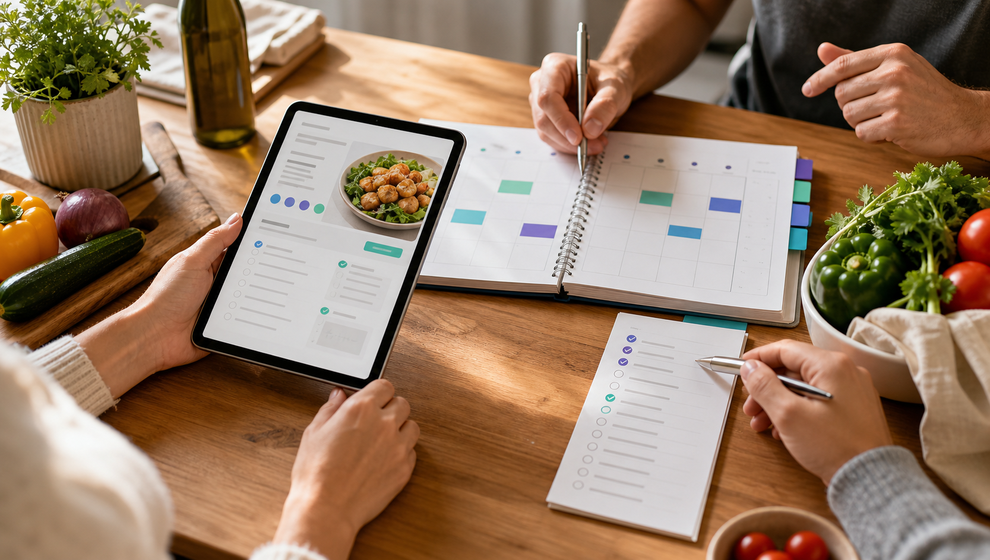
Saving a recipe is only the first step. For a family, the real work starts when that recipe has to become a meal on a real day, with real people involved, and a shopping list someone can actually use.
That is the practical gap Shareday is built to close. A recipe can live in the family recipe catalog, become a normal Event on the Family Calendar, include the relevant family members or child profiles during planning, and create a linked Shopping List from ingredients. The recipe, dinner plan, and shopping work stay connected instead of drifting into separate notes and messages.
This is not a promise of automatic meal planning, grocery delivery, or nutrition advice. Shareday’s role is more concrete: help the family organize the coordination around a meal.
Why recipe planning usually gets scattered
Family meal planning often breaks into pieces:
- one person saves the recipe;
- another person asks when the family is cooking it;
- someone else needs to know who is eating at home;
- the ingredients get copied into a separate list;
- the shopper marks items off somewhere the original planner may not see.
None of those steps is complicated by itself. The problem is that they often happen in different places. A recipe link sits in a browser tab. The dinner time sits in a calendar. The ingredient list sits in a note. A question about who is coming sits in a message thread.
Shareday brings those pieces into one family workflow. If you are comparing tools and searching for a family meal planning app, the important question is not just whether the app can store recipes. It is whether a recipe can turn into a plan the household can act on.
Start with the recipe your family wants to use
In Shareday, Family Recipes gives the household a shared recipe catalog. A family member can create a recipe manually, or import a recipe draft from a URL where supported. A recipe can store practical details such as title, source information, ingredients, instructions, and a hero photo where available.
That matters because a recipe becomes easier to reuse when the family can find it again. Shareday supports searching recipes by title, ingredients, and instructions, with filtering or sorting where supported. Adult family members can also upvote recipes, and cooked feedback with an optional comment or photo may be available where supported.
Keep this step simple. The recipe does not need to represent a whole weekly plan. It can be one dinner the family wants to make again, one meal idea someone found, or one dish that needs ingredient shopping before the week gets busy.
Turn the recipe into a meal event
After the recipe is saved, the next useful step is choosing when it will happen.
Shareday can plan a recipe onto the Family Calendar as a normal Event. That is an important detail. The planned meal sits alongside the family’s other planned items rather than becoming a separate recipe-only reminder. The Event can have a title, start time, end time, and notes, and it can be opened from the calendar like other planned items.
For families looking for a shared family calendar app, this is where recipes become part of the broader schedule. Dinner planning can sit next to school meetings, errands, sports practices, birthdays, tasks, and shopping lists. The meal is no longer just something someone meant to cook. It has a place and time in the family calendar.
Include the people who need the plan
Meal planning is rarely only about the recipe. The family also needs to know who is involved.
During recipe planning, Shareday supports assigning or inviting family members and child profiles. Use that step to reflect the actual household plan:
- everyone is eating together;
- one parent is cooking and another is shopping;
- a child profile is part of the dinner plan;
- only some family members need to see this meal Event;
- responsibility is not clear yet, so the plan stays visible while the family decides.
This does not guarantee participation, and it does not turn dinner into a formal project. It simply makes the planned meal easier to understand later. When the relevant people are attached to the Event, the family has less guessing to do.
Create the shopping list from ingredients
The shopping step is where recipe planning often becomes duplicate work. Someone opens the recipe, copies ingredients into a note, edits the note at the store, then sends another message when something is missing.
Shareday can create a linked Shopping List from recipe ingredients during recipe planning. For someone searching for a recipe app with shopping list, that connection is the useful part: the ingredients can become a Shareday Shopping List tied to the planned meal workflow.
The Shopping List remains a normal planned family item. It can include multiple rows, be assigned to no one, one person, multiple people, all relevant family members, or child profiles, and appear on the Family Calendar. Items can be marked as purchased or completed.
If the flow supports serving adjustment or an ingredient multiplier, use it only for the actual meal plan. Then review the list like a real shopper would. Remove anything already at home. Add practical extras if the family needs them. The linked list is a starting point for coordination, not a claim that the kitchen is automatically checked or the groceries are purchased for you.
What a connected meal plan looks like
A connected Shareday meal plan has a clear chain:
- The recipe is saved in Family Recipes.
- The recipe is planned as a normal Family Calendar Event.
- The relevant family members or child profiles are assigned or invited during planning.
- A linked Shopping List is created from the recipe ingredients.
- The shopper opens the list and marks rows as purchased or completed.
- Family members can open the Event or Shopping List from the calendar and keep the recipe context while the recipe exists.
That is the difference between storing a recipe and turning it into a family plan. A meal planner with grocery list can sound broad, but for Shareday the product-safe meaning is specific: a recipe can connect to a scheduled meal Event and a Shopping List that the family can use.
How to meal plan for a family without overbuilding it
If you are wondering how to meal plan for a family, start smaller than a full meal-planning system.
Choose one recipe. Pick one realistic date and time. Include the people who need to know. Create the Shopping List from the ingredients during planning. Assign the list if one person is responsible for shopping. After the meal, leave cooked feedback where supported if the family wants to remember how it went.
This keeps the workflow practical. The family does not need to plan every meal for the week before Shareday becomes useful. One connected recipe plan can show whether the household benefits from keeping the recipe, Event, people, and shopping list in the same place.
What Shareday does not claim to do
Clear boundaries make the workflow easier to trust.
Shareday is not presented here as a diet planner, nutrition guide, grocery delivery service, price comparison tool, pantry tracker, checkout flow, AI meal generator, or automatic weekly meal planner. It also does not guarantee that every invited family member will participate or that every shopping item will be completed on time.
The feature described here is the coordination layer around family meals. Shareday helps the household save a recipe, plan it on the Family Calendar, include the relevant people, create a linked Shopping List from ingredients, and keep those planned objects connected while the recipe exists.
A simple Shareday recipe-planning checklist
Use this checklist the next time a recipe needs to become dinner:
- Open Family Recipes.
- Create the recipe manually, or import a draft from a URL where supported.
- Review the title, source, ingredients, instructions, and photo where available.
- Plan the recipe onto the Family Calendar as a normal Event.
- Set the meal date and time.
- Assign or invite the relevant family members and child profiles.
- Create the linked Shopping List from recipe ingredients during planning.
- Edit the Shopping List for what the family still needs.
- Assign the Shopping List to the shopper if responsibility is clear.
- Let the shopper mark items as purchased or completed.
- Open the Event or Shopping List from the calendar when it is time to act.
- Leave cooked feedback where supported if the family wants to remember the result.
The point is not to make meal planning more elaborate. It is to keep the useful pieces connected long enough for the family to use them.
FAQ
Can Shareday turn a recipe into a calendar event?
Yes. Shareday can plan a recipe onto the Family Calendar as a normal Event. During planning, the family can choose the date and time and include relevant family members or child profiles.
Can Shareday create a shopping list from recipe ingredients?
Yes. During recipe planning, Shareday can create a linked Shopping List from recipe ingredients. The list can then be used like other Shareday Shopping Lists, including assigning responsibility and marking rows as purchased or completed.
Does Shareday connect recipes and shopping lists?
Shareday supports Family Recipes and linked Shopping Lists from recipe ingredients during planning. The product claim is specific: Shareday connects saved recipes, planned meal Events, and Shopping Lists for family coordination.
Does Shareday automatically plan weekly meals?
No claim is made here that Shareday automatically generates meal plans, recommends meals, handles nutrition planning, or builds a weekly menu for the family. The workflow described here starts from a recipe the family chooses and plans it onto the Family Calendar.
Why connect a meal Event and a Shopping List?
The Event gives the meal a date, time, and people. The Shopping List gives the family a practical ingredient list that can be assigned and checked off. Keeping both connected to the recipe helps the family understand what the meal is, when it is happening, and what still needs to be bought.