How to Make Shopping Easier for Another Family Member Without Losing Track
When one person writes the list and another person does the shopping, the hard part is not always the errand itself. It is keeping the plan clear.
Someone at home remembers milk, birthday candles, and laundry detergent. Someone else is already near the store. A third person asks whether the medicine pickup is still needed. The list starts in a message thread, gets edited in another note, and by the time the shopper is in the aisle, nobody is completely sure what has already been bought.
Shareday is built for this kind of family coordination. A shopping list can be planned in the same family context as the calendar, assigned to the person handling the errand, opened when it is time to shop, and updated as rows are purchased or completed.
That does not mean Shareday buys anything for you, tracks anyone’s location, or connects to a store checkout. The value is simpler: one family member can prepare the plan, and another can work through it without turning the whole errand into a long chat thread.
Why shopping for someone else gets messy
Shopping errands often sound small until several people are involved.
A parent may be planning groceries for dinner while a partner is driving home. A caregiver may need someone else to pick up household basics. A family member may be getting birthday supplies and wants to know which gift items are already handled. One person knows what needs to be bought, but another person is the one actually going.
The common failure points are familiar:
- the list lives in a private note;
- the latest item is buried in a message;
- nobody knows who is responsible for the errand;
- two people buy the same thing;
- the shopper forgets to say what was completed;
- missing items are mixed into normal conversation.
A family shopping list works better when it separates planning from discussion. Chat can still be useful for questions, but the list itself needs a place where responsibility and completion state are easier to see.
What a shared list should make clear
The goal of a shared list is not to make the household more complicated. It is to answer a few practical questions quickly:
- What needs to be bought?
- When is this errand connected to the family plan?
- Who is handling it?
- Which items are already purchased or completed?
- What is still open?
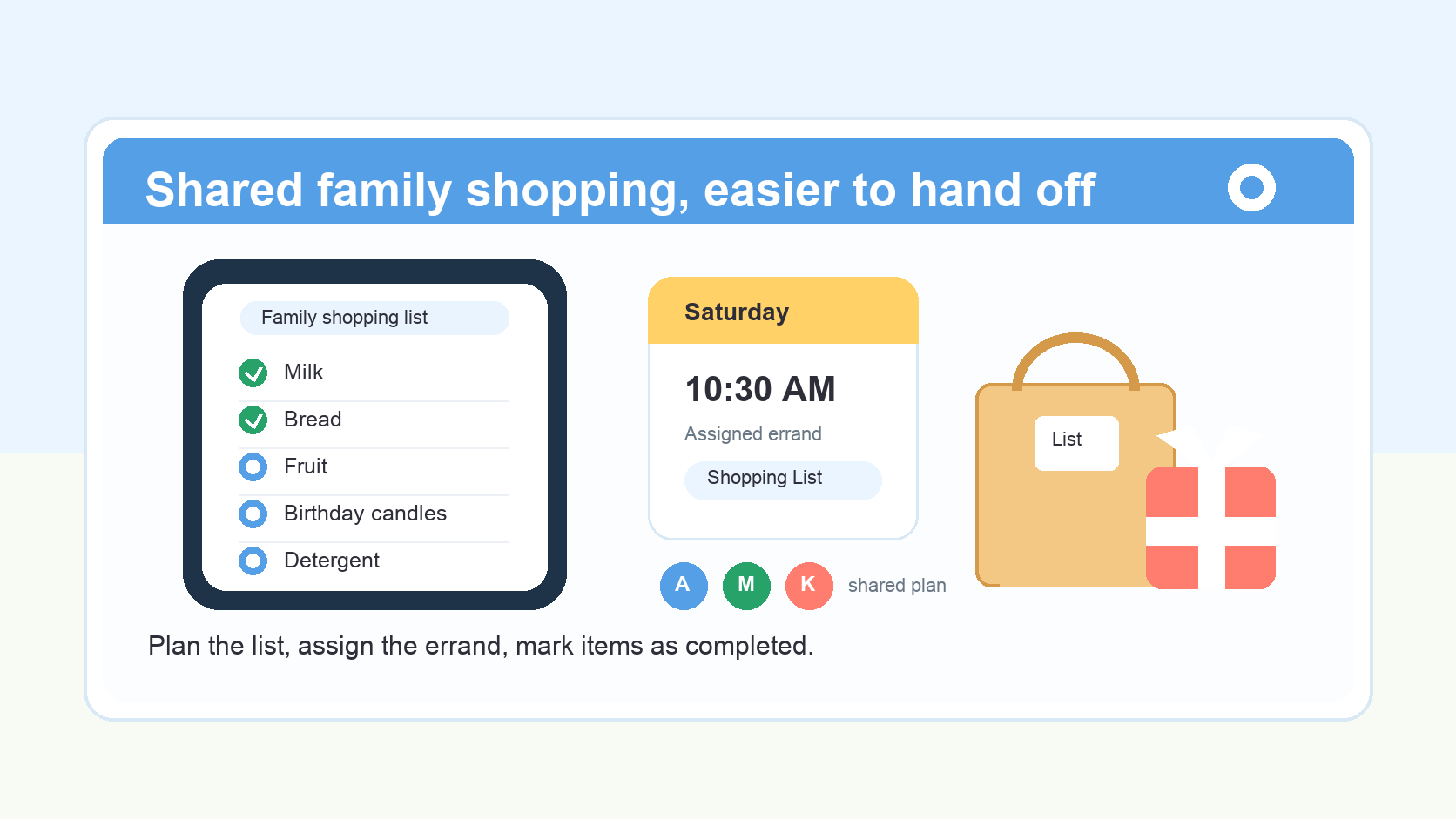
Shareday Shopping Lists are planned family items for purchases and errands. They can include multiple rows or items, be assigned to one person or more than one person, and appear on the Family Calendar. Rows can be marked as purchased or completed, so the list is more than a static note.
That makes Shareday useful as a shared shopping list app for families who already coordinate around dates, responsibilities, and everyday errands.
A simple Shareday workflow for shopping on someone else’s behalf
The practical workflow is straightforward.
1. One person creates the Shopping List
A family member can open the Family Calendar or Shopping List creation flow and create a Shopping List for a specific date or time. That matters because errands often belong to a larger plan: dinner, a birthday, a school week, a trip, or a household restock.
Instead of keeping “buy fruit and candles” as a loose message, the list becomes a planned family item.
2. They add the items
The creator adds the purchase rows: groceries, household products, birthday supplies, school materials, or other needed items. The list can hold multiple rows, so the family does not have to split the errand across several messages.
For example:
- milk;
- bread;
- fruit;
- birthday candles;
- wrapping paper;
- cleaning supplies;
- a pharmacy pickup reminder, written as an errand item rather than medical advice.
The point is to keep the shopping action clear, not to turn Shareday into a purchasing, health, or delivery tool.
3. They assign the list to the shopper
Shareday supports assigning a shopping list to no one, one person, multiple people, all relevant family members, or child profiles. For this scenario, the useful move is assigning it to the person who will go shopping.
That assignment turns “can someone get this?” into “this person owns this errand.” If the person is a newly assigned adult family member, Shareday may attempt push or email delivery where notification delivery is available and configured. That should not be read as a guaranteed notification promise, but it can support the handoff when configured.
4. The shopper opens the list before or during the errand
The assigned person can open Shareday, find the Shopping List from the calendar or list context, and use it while shopping.
This is where a shopping list app for family coordination is different from a private checklist. The list is connected to the shared family plan, so the shopper is not depending only on memory or a copied message.
5. Purchased items get marked as completed
As items are bought, the shopper marks rows as purchased or completed. After sync and rehydration, the completed state stays connected to the shared family item, so the original creator and other family members can see progress in the shared planning context.
The safe claim is completion state connected after sync/rehydrate. Shareday should not be described as guaranteeing instant real-time collaboration in every situation.
When a shared grocery list is useful
Groceries are the most obvious use case because they change constantly. A shared grocery list helps when one person knows what is missing at home and another person is near the store.
But the same structure can work for more than groceries:
- birthday errands, such as candles, cards, or small gifts;
- household purchases, such as detergent or paper towels;
- school supplies;
- trip items;
- recipe ingredients when a recipe-linked Shopping List is created during recipe planning;
- gift ideas when a Birthday-linked Shopping List is created.
The list stays practical because it is not just a pile of text. It has rows, assignment, calendar context, and purchased/completed state.
Why a shareable shopping list beats a message thread
Message threads are good for discussion. They are less reliable as the final source of truth for shopping.
In a thread, a family member may write, “Can you also get bread?” Then someone else adds, “Actually get two.” Later, the shopper replies with a photo, and another person asks whether fruit was handled. The information is all there, but the status is hard to scan.
A shareable shopping list keeps the action in one place:
- items are rows instead of scattered messages;
- the responsible person can be assigned;
- purchased/completed rows can be marked directly;
- the list can appear as a planned Shopping List on the Family Calendar;
- unassigned planned items can be visible separately when they exist.
The family can still talk about substitutions or preferences in normal conversation. The list carries the practical status.
How Shareday fits into the family calendar
Shopping is often tied to time. Groceries may be needed before dinner. Birthday supplies may need to be ready before the weekend. A school item may be needed before Monday morning.
Shareday’s Family Calendar is the central planning surface for the product. It can display family planned items in one calendar, including Shopping Lists. It can show planned items by day and time, open planned items from the calendar, and filter the calendar by family member or child profile where available.
That helps families see shopping as part of the wider plan. The errand is not floating separately from the date, the person responsible, or the family schedule.
For busy households, this is the difference between “I sent you the list somewhere” and “the list is part of the family plan.”
What Shareday does, and what it does not do
Product clarity matters, especially when families are choosing tools for everyday coordination.
Shareday can support:
- creating, editing, and deleting shopping lists;
- adding multiple shopping list rows or items;
- marking rows as purchased or completed;
- assigning shopping lists to no one, one person, multiple people, all relevant family members, or child profiles;
- displaying shopping lists on the Family Calendar;
- using Birthday-linked Shopping Lists for birthday gift ideas;
- creating recipe-linked Shopping Lists from recipe ingredients when planning a recipe;
- keeping shopping-list creation and edits local-first on the iOS client before backend sync;
- attempting push or email delivery for newly assigned adult family members on planned items where configured.
Shareday should not be described as:
- a payment or purchase automation service;
- a delivery-service tool;
- a barcode scanner;
- a store inventory or checkout integration;
- a location-tracking app;
- an AI shopping assistant;
- a medical, therapy, emergency, or child-safety monitoring product;
- a guarantee of instant updates or guaranteed notification delivery.
The supported promise is narrower and more useful: Shareday helps families keep shopping lists connected to assignment, calendar context, and item completion state.
A practical example
Imagine a family preparing for Saturday.
One person creates a Shopping List for Saturday morning and adds bread, fruit, milk, birthday candles, and a few household items. They assign the list to the person who will be near the store. The list appears in the shared family planning context instead of sitting in a private note.
Before the errand, the assigned person opens Shareday and checks the list. During the trip, they mark rows as purchased or completed. After sync/rehydration, the completion state remains connected to the shared family item, so the person at home can see what has been handled.
Nobody needs to search through a long thread to figure out whether candles were bought. The list carries the status.
FAQ
Is Shareday a shared shopping list app?
Yes. Shareday supports Shopping Lists that can be created, edited, assigned, displayed on the Family Calendar, and updated with purchased/completed item state. It should not be described as a purchasing, delivery, barcode, payment, or store-integration tool.
Can Shareday be used as a family shopping list?
Yes. A family member can create a Shopping List, add multiple rows, assign it to the shopper, and keep the list connected to the Family Calendar. Rows can be marked as purchased or completed.
Is Shareday a shopping list app for family errands beyond groceries?
Yes. Grocery runs are a natural example, but Shareday Shopping Lists can also support household purchases, birthday errands, school supplies, trip items, and other family purchase planning.
Can Shareday make a shared grocery list?
Shareday can be used for a shared grocery list by creating a Shopping List, adding grocery rows, assigning responsibility, and marking purchased/completed items during the errand.
Does Shareday notify the assigned shopper?
Shareday supports push/email delivery attempts for newly assigned adult family members on planned items where configured. This is qualified behavior, not a guarantee that every notification will always be delivered.
Does Shareday update the list instantly for everyone?
The documented scenario is that completed state stays connected to the shared family item after sync/rehydrate. The article should not promise instant real-time collaboration or universal offline behavior beyond the documented local-first iOS creation/edit behavior before backend sync.
Make the errand easier to hand off
Shopping for another family member works best when the handoff is clear.
The person planning the errand should not have to keep rewriting the list in chat. The person doing the shopping should not have to guess which message is current. The rest of the family should not have to ask what was already bought.
Shareday gives the family a practical structure: create the list, add the rows, assign the shopper, connect the errand to the Family Calendar, and mark items as purchased or completed. For everyday groceries, birthday supplies, household items, and other shared errands, that can make the plan easier to follow without pretending the app does the shopping for you.